
Art Of Creation – Dynamics AX Blog
The everyday life of a Dynamics AX developer
Hi again.
In part 1, we created a nice batch using data contracts, service operation and the SysOperationServiceController class.
Today, we will place our menu item on the Customers form, so we can process the customer that is selected in the grid. It will look like this:

A thing that is still missing though, is a way to work with the Args that are passed when a menu item is executed. We want to be able to set the query on our data contract before showing the batch dialog. We might also want to have a default value in some fields, for example, the date should be today’s date every time we launch the dialog.
We can do all of that by extending the SysOperationServiceController class.
So let’s do that!
Create a new class that extends SysOperationServiceController
Now let’s create a method that constructs an instance of this class based on the Args object
Above is the basic code that should be in your construct method. However, this doesn’t do anything more than the SysOperationServiceController already does, so let’s add the logic that sets the date to today’s date.
As you can see, the Data Contract is fetched using the getDataContractObject() method. This will also unpack any values that were packed before, just like a normal RunBase would.
Setting the date is a simple as setting the parm method on the data contract.
Now let’s add the logic that creates the correct query by adding a range based on the record in the Args variable.
There you go. Now we need to make a main method that uses this construct method, and starts the operation:
We also need to create a new menu item. Right click you project – New – Menu Item.
Enter the following properties:
ObjectType: Class
Object: KlForCustTesterServiceController
Parameters: KlForCustTesterDataService.testCustomer
Next, add the menu item to the CustTable form:

Finally before testing, click the Generate Incremental CIL button to generate CIL.

Right click the CustTable form and click Open. This will open the Customers form. Switch to the grid view (Ctrl + Shift + G), and select a record. Then click the button we just added.
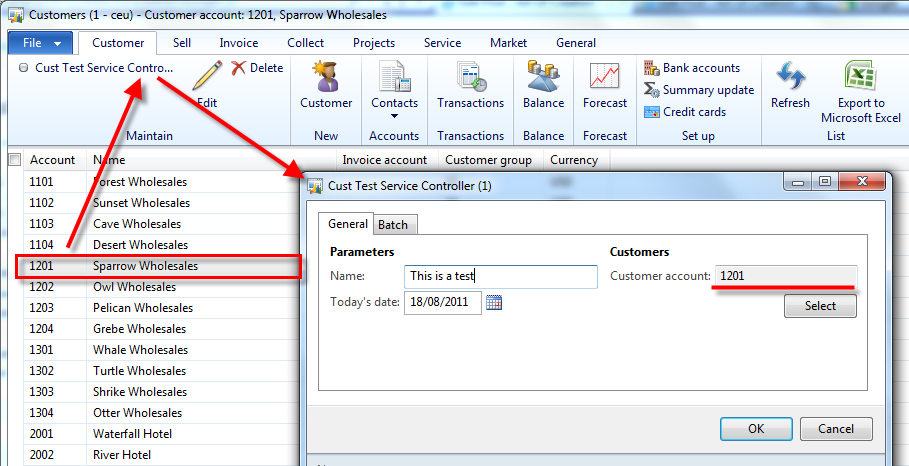
Note: a bug (or something I do wrong?) I found is that the query values that are displayed on the dialog seem to be “lagging”. The wrong values are shown, but when you click ok, the correct values are used, unless you click the select button.
This can be fixed by adding this line before returning the controller object:KlForCustTesterServiceController.queryChanged("_klForCustTesterDataContract.parmQuery", query);This is probably not a nice way to do this, so I’ll look into it, and let you know.
When you click Ok on the dialog, you should see that only the customer you’ve selected will be processed. You will also see that the date has been set to today’s date, just like we wanted.
Hi All :-)
This is part 1 of a series of 3 blog posts where I demonstrate how to create batch classes using the SysOperation classes (Read the introduction here)
We are going to create a batch that looks like this:

And we are going to do that without creating a RunBaseBatch class!
Note: Just to be clear: the batch class won’t actually do anything useful, everything is just for demo purposes.
Okay, let’s start!
First, we will create a data contract. The data contract contains data members that represent the fields that will be available on the dialog.
Let’s create a new class, KlForCustTesterDataContract:
The string DataContractAttribute indicates that this class is a Data Contract. The square brackets [] indicate that this string is an attribute (You can read more about attributes on MSDN).
Next, let’s add Data Members to this contract by first declaring them in the class declaration
We add a string field, a date field, and a query. We still need to create parm methods for these variables.
This is just a simple string field, nothing special here except for the DataMemberAttribute attribute that indicates that this method is da data member.
The date field is of type TransDate, so we’ll give it a nicer label by using the SysOperationLabelAttribute attribute to specify the label used.
Also note that, when two attributes are specified, the are separated by a comma (,).
We will also add a query, so we can loop all customers. As you can see, we can specify the query by using the AifQueryTypeAttribute. The query KlForCustomers is just a query in the AOT with CustTable as a datasource (see xpo file at the end).
Next, we add two helper methods that are not Data Members, so we can easily set and get the query variable.
To get the query:
To set the query:
Next, let’s create a service class called KlForCustTesterDataService.
Right click the class, click properties, and set the run on property to server.
Adding a service operation to this service class is as simple as adding a method. As you can see, the SysEntryPointAttribute attribute indicates that this is a service operation, and our data contract is used as an argument.
Of course, this method needs some demo functionality, so let’s add that:
Right click your project, and choose New – Service. Give this service the same name as the service class, KlForCustTesterDataService.
In the properties of this node, set the class property to KlForCustTesterDataService
Expand the node of your service, then right click on the Operations node.
Click Add operation and check the add checkbox next to the method we’ve created, and click OK.
All we need to do now is create a menu item so we can start our dialog.
Do this by right clicking your project – New – Menu item. Name it KlForCustTesterDataService.
Enter the following properties:
ObjectType: Class
Object: SysOperationServiceController
Parameters: KlForCustTesterDataService.testCustomer
As you can see, we don’t link directly to our service class, in stead, the class SysOperationServiceController will be used, and will know what service operation to start because it is specified in the parameters property. More about these controller class in part 2 of this series.
But wait, we still have to do one small thing: compile our X++ into the common intermediate language (CIL). Don’t worry, it’s easy. Just click the Generate Incremental CIL button in the toolbar (this might take a while).
After CIL was generated, right click the menu item and click Open. You should see your batch class. As you can see, all fields from the datacontract are displayed, and a select button was automatically generated so you can modify the query.

Output when run in batch:

In part 2, we will take a closer look at the SysOperationServiceController class. See you tomorrow.
Hi everyone!
Dynamics AX 2012 introduces a new way for creating batches, without using the RunBaseBatch class. The SysOperation* classes are part of the Business Operation Framework, and can be used to create these batches.

Some documentation is already available on MSDN about the BOF and the SysOpertation classes, but I was still confused when creating such a batch class. That is why in the next 3 days, I will cover the basics on how to create these batches, so you don’t have to figure it all out on your own.
I hope to get some feedback too, because not everything is crystal clear to me either :-).
But anyway, this is what you can expect in the next 3 days:
Day 1 (link)
A demonstration on how to create Data Contract classes and Service Operations. You will also learn how to use attributes like DataContractAttribute and DataMemberAttribute, and at the end, we will already have a working batch class.
Day 2 (link)
We will take a closer look at the SysOperationServiceController class, and will be creating our own controller. This will allow us to set properties on our Data Contract based on Args. This is useful when you batch is started by a button on a form that is linked to a datasource.
Day 3 (link)
To make a fully functional batch, we need to be able to overwrite methods on our dialog field like lookup and modified. We also want to be able to change the properties of these fields, like enabling or disabling them. That’s just what the SysOperationAutomaticUIBuilder class is for, and we’ll look into that.
Hi all.
Here’s a list of af few reasons why I think it is important to fix those best practice errors :-).
Improved performance
Many best practices have an influence on performance. For example, it is best practice to set the property CreateRecIdIndex to True on tables with Created/Modified DateTime fields. If you don’t, this will have an adverse effect on the performance of those tables.
Another example is that if you adhere to the best practices concerning the construction of classes and the use of batch classes, it will be much easier to improve performance by enabling batch multi-threading.
Improved readability of code
When all developers follow best practices about formatting of code, the code will be more readable and easier to understand. Avoiding dead code and removing unused variables will also make the code less confusing.
Developers learn
There are a lot of handy things you can learn by solving best practice deviations. Adding fields to field groups for example is a great way to avoid customizations to forms. And by figuring out what configuration is needed on a menu item, you learn about what effect configuration keys have on you solution.
Improved security
Adding security and configuration keys is vital to good security. When ignoring best practices, an unauthorized user might cause a big mess that you’ll have to clean up.
Certified for Dynamics AX
Making sure your solution is best practice deviation free goes a long way towards passing the Software Solution Test.
Better user experience
Some best practices have to do with labels, help texts, descriptions for batch task, etc. If you ignore those, it will be more difficult for the user to understand the solution you created.
Hi all,
Exception handling can be quite confusing in Dynamics AX, so I wanted to share some quick facts about try/catch and transactions.
The general rule is that exceptions are caught in the outer most catch, where the ttslevel is 0. This means that if you put a transaction around a try/catch, your exceptions will not be caught.
The following two jobs demonstrate that:
Transaction inside try/catch:
Output:
Error an error
Info error caught
Try/catch inside transaction:
Output:
Error an error
As you can see, the error is not caught when the transaction is around the try catch.
However, there are two exceptions to this rule.
The following code demonstrates that UpdateConflict and DupplicateKeyException can be caught inside a transaction.
Output:
Info Info can only be caught outside of the transaction
Info Warning can only be caught outside of the transaction
Info Deadlock can only be caught outside of the transaction
Info Error can only be caught outside of the transaction
Info Internal can only be caught outside of the transaction
Info Break can only be caught outside of the transaction
Info DDEerror can only be caught outside of the transaction
Info Sequence can only be caught outside of the transaction
Info Numeric can only be caught outside of the transaction
Info CLRError can only be caught outside of the transaction
Info CodeAccessSecurity can only be caught outside of the transaction
Warning UpdateConflict can be caught inside transaction
Warning UpdateConflict can also be caught outside of the transaction
Info UpdateConflictNotRecovered can only be caught outside of the transaction
Warning DuplicateKeyException can be caught inside transaction
Warning DuplicateKeyException can also be caught outside of the transaction
Info DuplicateKeyExceptionNotRecovered can only be caught outside of the transaction
Info Timeout can only be caught outside of the transaction
Info PassClrObjectAcrossTiers can only be caught outside of the transaction
It is also noteworthy that, when you enter a catch block, there has been a implicit ttsabort, so the transaction has been rolled back. However this is not true for UpdateConflict and DuplicateKeyException when they were caught inside a transaction.
Hi all!
The code below contains a try/catch that I use a lot when developing batch jobs, especially multithreaded ones.
It deals with frequently occurring exceptions that, in some cases, can be easily solved by retrying:
Duplicate key conflicts are more rare than update conflicts, but I’ve seen them pop up under heavy load on InventDim records.
Hi all :-)
Today, when testing newly deployed AIF web services, this error was thrown:
There is no service with namespace = ‘http://yournamespace’ and external name = ‘aService’.
Where ‘http://yournamespace’ is the namespace you specified on the service node in the AOT, and ‘aService’ is the external name of your service.
The problem is that on the service node of this service in the AOT, there was a ‘/’ (slash) at the end, like this:

Removing the slash at the end fixes the problem:

I did a refresh in the Service form and redeployed my services on the IIS, so you might have to do that too.
Today, the following message popped up when synchronizing the Data Dictonary (Dutch):
Kan meerdere records in Table list (SqlDictionary) niet toevoegen. Tabel: 118, 4.
De SQL-database heeft een fout gegenereerd:
It roughly translates to:
Cannot insert multiple records in Table list (SQLDictionary). Tabel 118, 4. The SQL-Database has issued an error:
Thanks to my colleague Kenny, we quickly figured out that the problem was that the disk was full on the SQL server where the data and log files were stored. SQL server also logged an error in the event viewer on the SQL server saying that the disk was full.
Lessons learned:
Hi everyone.
I want to do an other post about performance. But not so much about exotic SQL stuff or hidden settings, but simple X++ performance tips.
These are the first things I do and look for when there is a performance problem, because they are easy and obvious things to fix.
Tip 1: Measure execution time of your code
Measuring is knowing. Before you start changing code, make sure you have a set of data you can keep reusing for your tests. Measure the performance of your code on that data after each change in code so you know the impact of your changes.
One way to do this is by using the Winapi::getTickCount() (or WinApiServer::getTickCount() if your code runs on server) method.
Tip 2: limit the number of loops
A LOT of time goes into loops. If you have a performance problem, start looking for loops. Code can run really fast, but it can get slow when it is executed too many time, eg, in a loop.
Tip 3: avoid ‘if’ in ‘while select’
When there is a ‘if’ in a ‘while select’, see if you can rewrite it a a where statement in your select. Don’t be affraid use a join either. Consider the following example:
Tip 4: avoid double use of table methods
Using table methods a lot can get really slow if you do it wrong.
Consider the following example:
This example code looks nice, but there’s a problem.
The salesLine.inventDim() method contains the following:
This means that the invendDim record is read three times from the database.
It is better to declare the inventDim record locally and only retrieve it once:
Tip 5: Don’t put too much code on tables
Code on tables is usually fast, but things can get slow if you use it to much.
Say you have a table with an InventDimId field. If you have 5 methods that need the InventDim record, because you don’t have a classDeclaration method on your table, you need to call this function 5 times, once in every method:
.
When you put these methods on a class, you could optimise it by fetching the record only once and storing it in the classDeclaration, or better, passing it as a parameter to your methods.
An other example is fetching parameters from parameter tables, eg InventParameters::find(). On a table, you have to fetch it each time you call a method. In a class, you would probably optimize your code to only fetch the parameter record once.
Tip 6: Use the fastest code
For some tasks, there is ‘special code’ that is faster than the code you would normally write.
For example:
The same applies to update_recordset for updating records.
Also, when adding values to the end of a container
is faster than
Tip 6: Every optimization counts
Remember that every optimization you do to you code counts, even if it’s a little one. Small performance tweaks can have a huge effect once you process large quantities of data. So don’t be lazy, and optimize :-).
Many of you are at the technical conference right now, but if you’re not (like me unfortunately), you’re probably readling blogs to see what’s new in AX2012 (aka AX6).
Two of my colleagues are there, and they are keeping up to their promise of blogging about the interesting stuff that is being unveiled (thanks guys!).
Check out their blogs:
– Tom Van Dyck
– Kenny Saelen (or follow on twitter)
Also check the #DAXCONF tag on twitter for tweets.
Warning: it could be overwhelming ;-)
Happy new year to everyone!
I wish you all a lots of successful Dynamics AX implementations in 2011 ;-).

(Image © jscreationzs)

For everyone that missed (part of) the AX day of Decisions Fall 2010 yesterday, the sessions will be available on demand somewhere next week.
Keep an eye on their website.
Tomorrow the 1st of November is the start of Decisions Fall 2010, a 4 day, free online virtual conference about AX, GP, NAV and CRM.

Check out what sessions are available for AX here: Dynamics AX program
You can still register (for free) for this event, so what are you waiting for :-).
Thank to Kenny for letting me know about this event.
Hi All!
Here’s a trick I learned from a colleague:
With the class UserConnection, you can make sure a transaction isn’t rolled back even if the transaction it is in is rolled back.
Consider the following example:
The record will not be inserted, because an error is thrown that causes an implicit ttsabort (so the tranaction is rolled back), right?
Well, you can counter this behavior by using the UserConnection class:
You will see that the CustTable record will be inserted in the example above.
This can be useful if you really want a record to be inserted, for example when doing logging (like in batch processes, or when debugging).
When you don’t use a UserConnection, your logging will be rolled back together with other transaction.

The Belgian Dynamics Community organized a ‘Connection Day’ about Performance Optimization on the 1st of October.
They have put the session content online here .
If you are looking for ways to solve performance issues, be sure to check it out.
Also, I found this nice PowerPoint presentation titled ‘AX Troubleshooting Tips’ while searching for ways to trace long running queries.
Download it here.