« »

search

Art Of Creation – Dynamics AX Blog

 The everyday life of a Dynamics AX developer

  • See you at Convergence 2010, The Hague

    October 16, 2010 at 23:42  (1 comment)

    Hi all!

    Together with some of my collegues at RealDolmen, I will be attending Convergence 2010 in The Hague (Den Haag), The Netherlands, on Oktober 21st.

    You can expect a blog post about Convergence next week.
    Update: The content of Convergence wasn’t technical enough to be posted on this blog.

    See you then (or there).

  • Batch multithreading

    October 3, 2010 at 13:57  (22 comments)

    Do you have batches that run for hours? After reading this post (and doing some coding), they might just run in minutes.
    How? By creating multiple tasks in your batch job at runtime. Read on :-).

    Introduction

    Normally, when you schedule your RunBaseBatch class as a batch job, it will create one task.
    You can check this under Basic – Periodic – Batch Job when you have scheduled a batch job.
    In a diagram, it looks like this:

    This batch task will execute everything on one batch session on one batch server.

    But in AX 2009, your batch group can be added to multiple AOS server, and an AOS server can process multiple tasks simultaneously. So how can we use this to speed up our batch job?

    We do it by splitting up our task in multiple smaller ones, which are then distributed over multiple batch sessions (threads) and over multiple AOS servers.

    Like this:

    Example

    In this example, I will loop all my customers, and simulate a process that runs for 3 seconds by using the sleep() function.

    Note: download the .xpo file below.

    Single thread


    First, let’s create a batch job like we normally would.
    For this, I create 2 classes:

    1. KlForUpdateCustomers: A class that contains my business logic I want to execute
    2. KlForUpdateCustomersSingleTheadBatch: A class that extends RunBaseBatch and makes calls to KlForUpdateCustomers

    KlForUpdateCustomers
    This class contains this in its run method (see xpo file for other methods):

    public void run()
    {
        ;
        // simulate a process that takes 3 seconds
        sleep(3000);
        info(strfmt('updated customer %1', this.parmCustTable().AccountNum));
    }

    KlForUpdateCustomersSingleTheadBatch
    This class is our batch class so it extends RunBaseBatch. It has a queryRun, and has this run method:

    public void run()
    {
        CustTable custTable;
        ;

        while(queryRun.next())
        {
            custTable = queryRun.get(tablenum(CustTable));

            KlForUpdateCustomers::newcustTable(custTable).run();
        }
    }

    It loops all customers, and makes a call to the class we created earlier for each customer. To keep it simple, I did not add exception handling to this example.

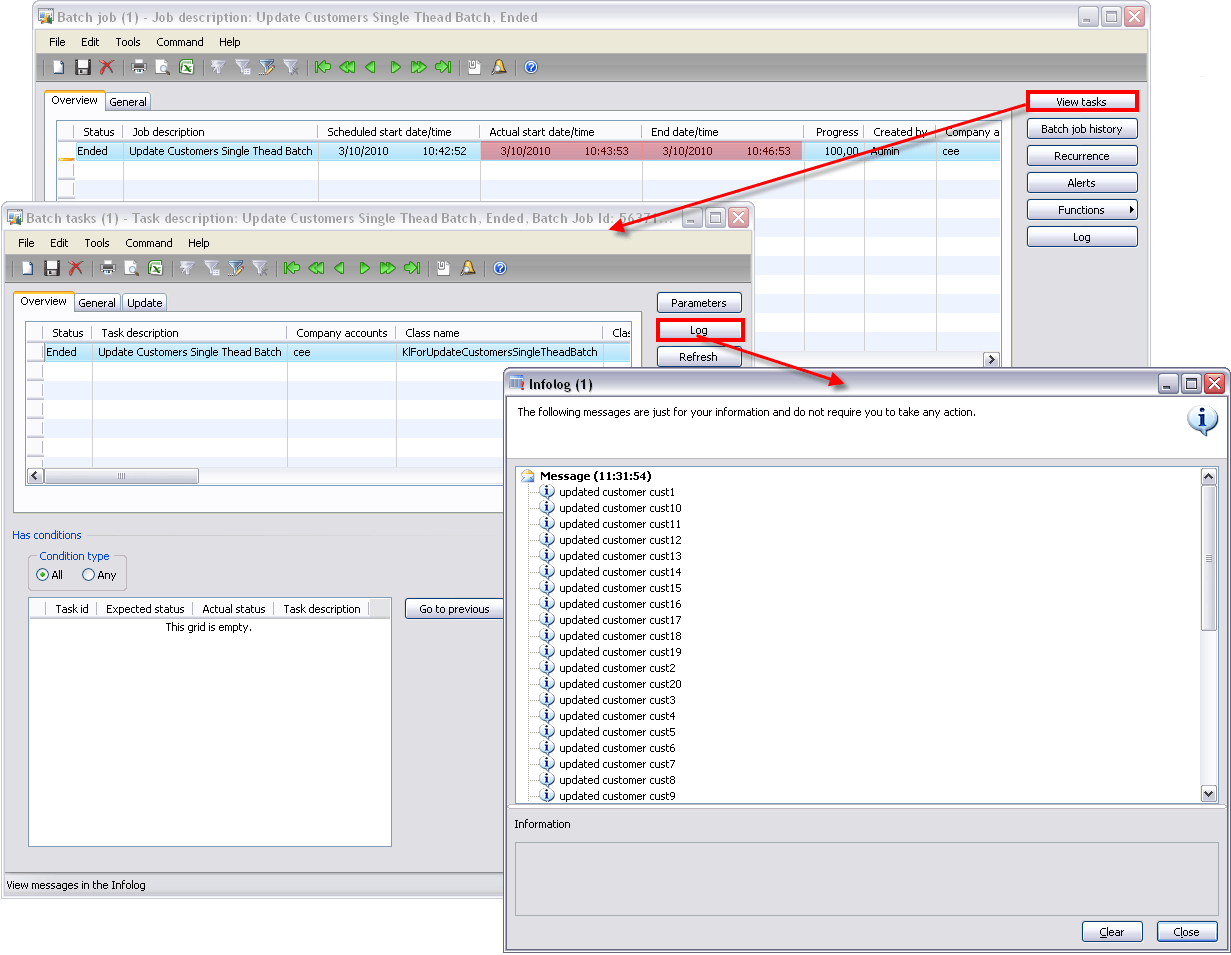
    When we run this in batch, a single batch task is created in the batch job that runs for about 3 minutes (according to the batch job screen).
    Multithread


    To rewrite this batch job to use multiple tasks, we will need 3 classes:

    1. KlForUpdateCustomers: the business logic class we created earlier and we can reuse
    2. KlForUpdateCustomersMultiThreadBatch: The class that represents the batch job and will create batch tasks
    3. KlForUpdateCustomersMultiThreadTask: The class that represents one batch task and makes calls to KlForUpdateCustomers

    KlForUpdateCustomers
    This class is the same as before and processes one customer (CustTable record).

    KlForUpdateCustomersMultiThreadTask
    This class extends RunBaseBatch and represents one of the many batch tasks we will be creating. In this example it processes one CustTable record, so a task will be created for each CustTable record.

    The run method looks like this:

    public void run()
    {
        ;
        KlForUpdateCustomers::newcustTable(this.parmCustTable()).run();
    }

    KlForUpdateCustomersMultiThreadBatch
    This is our batch job class, and this is where the real magic happens. This class will create multiple instances of KlForUpdateCustomersMultiThreadTask and add them as a task to our job at run time.

    This is how the run method looks:

    public void run()
    {
        BatchHeader                         batchHeader;
        KlForUpdateCustomersMultiThreadTask klForUpdateCustomersMultiThreadTask;
        CustTable                           custTable;
        ;

        while(queryRun.next())
        {
            custTable = queryRun.get(tablenum(CustTable));

            if(this.isInBatch())
            {
                // when in batch
                // create multiple tasks
                if(!batchHeader)
                {
                    batchHeader = BatchHeader::construct(this.parmCurrentBatch().BatchJobId);
                }

                // create a new instance of the batch task class
                klForUpdateCustomersMultiThreadTask = KlForUpdateCustomersMultiThreadTask::newcustTable(custTable.data());

                // add tasks to the batch header
                batchHeader.addRuntimeTask(klForUpdateCustomersMultiThreadTask, this.parmCurrentBatch().RecId);
            }
            else
            {
                // when not in batch
                KlForUpdateCustomers::newcustTable(custTable).run();
            }
        }

        if(batchHeader)
        {
            // save the batchheader with added tasks
            batchHeader.save();
        }
    }

    As you can see, for each custTable record, we create a new task. When the batch job doesn’t run in batch, we process it as we otherwise would using one session.

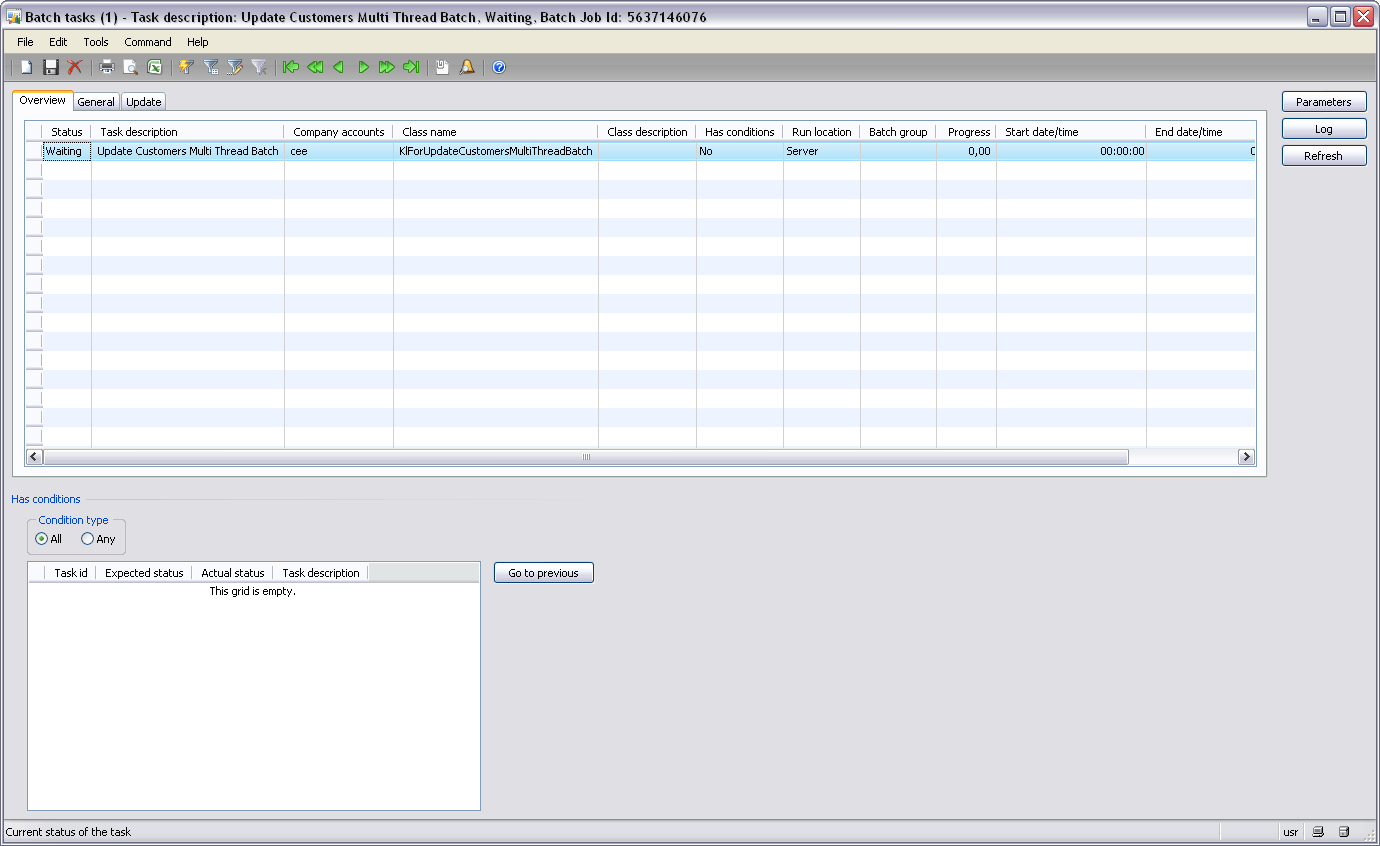
    In the batch tasks screen (Basic – Inquiries – Batch Job – (select you batch job) – View Tasks), you can clearly see what happens.

    First, the status is waiting, and one task has been created.
    Then, when the batch job is executing, we can see that multiple tasks have been added to our batch job.
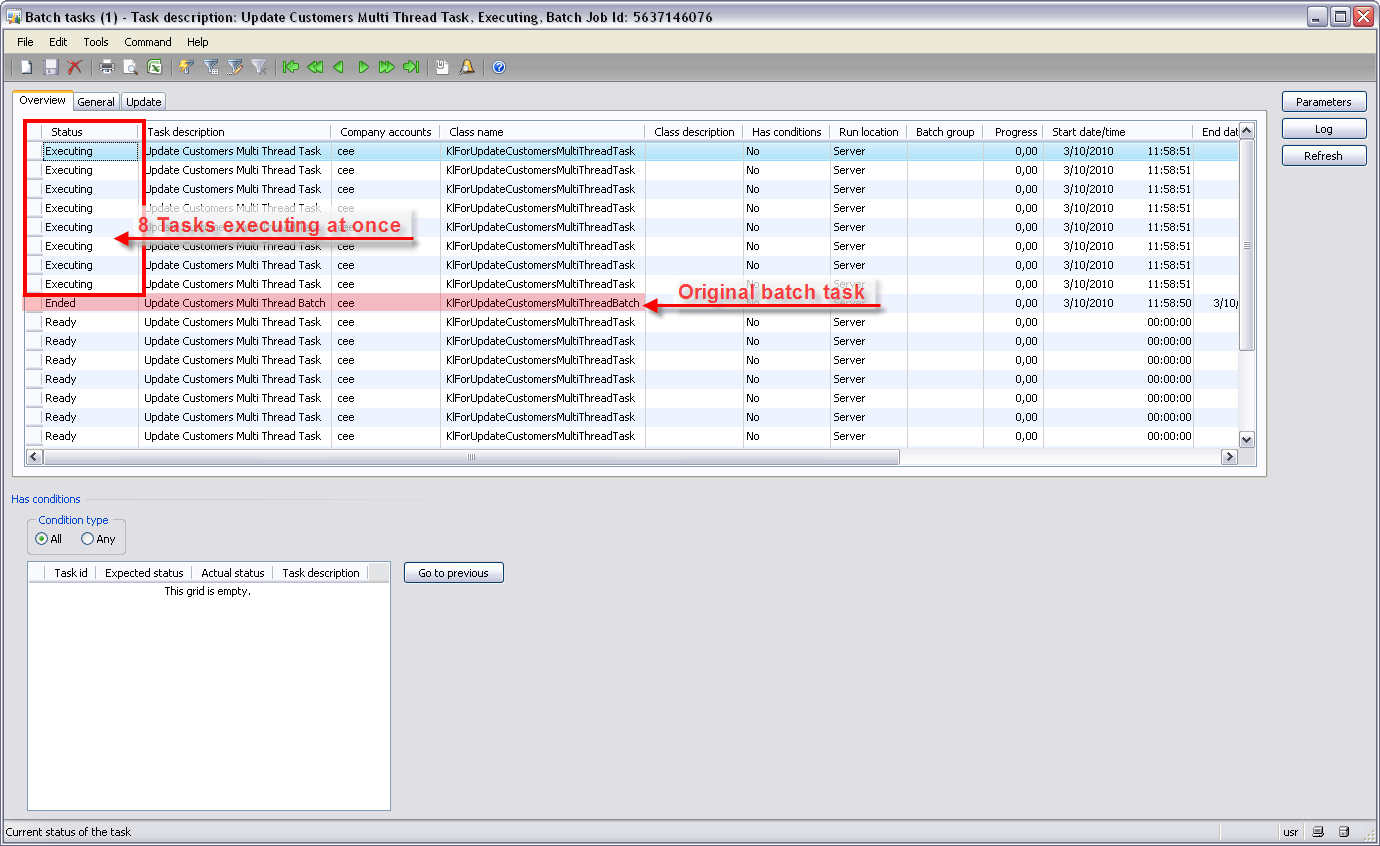
    We can also see that it processes 8 tasks at the same time! This is bacause the maximum number of batch threads is set to 8 on the batch server schedule tab of the Server configuration screen (Administration – Setup – Server configuration).

    Finally, we can see that the job has ended, and that all runtime tasks have been moved to the batch job history:
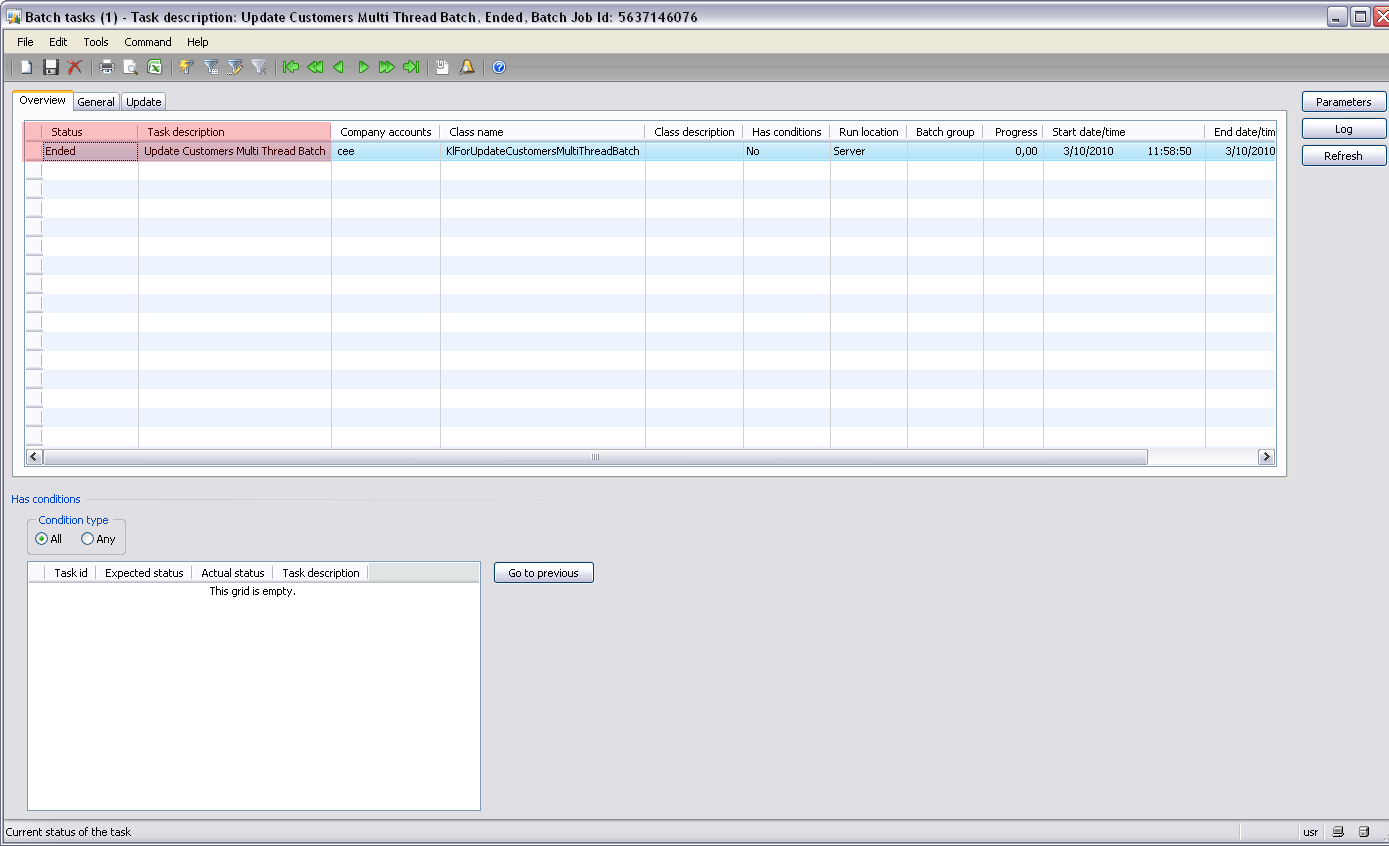
    You can view the history and the log of this batch job:
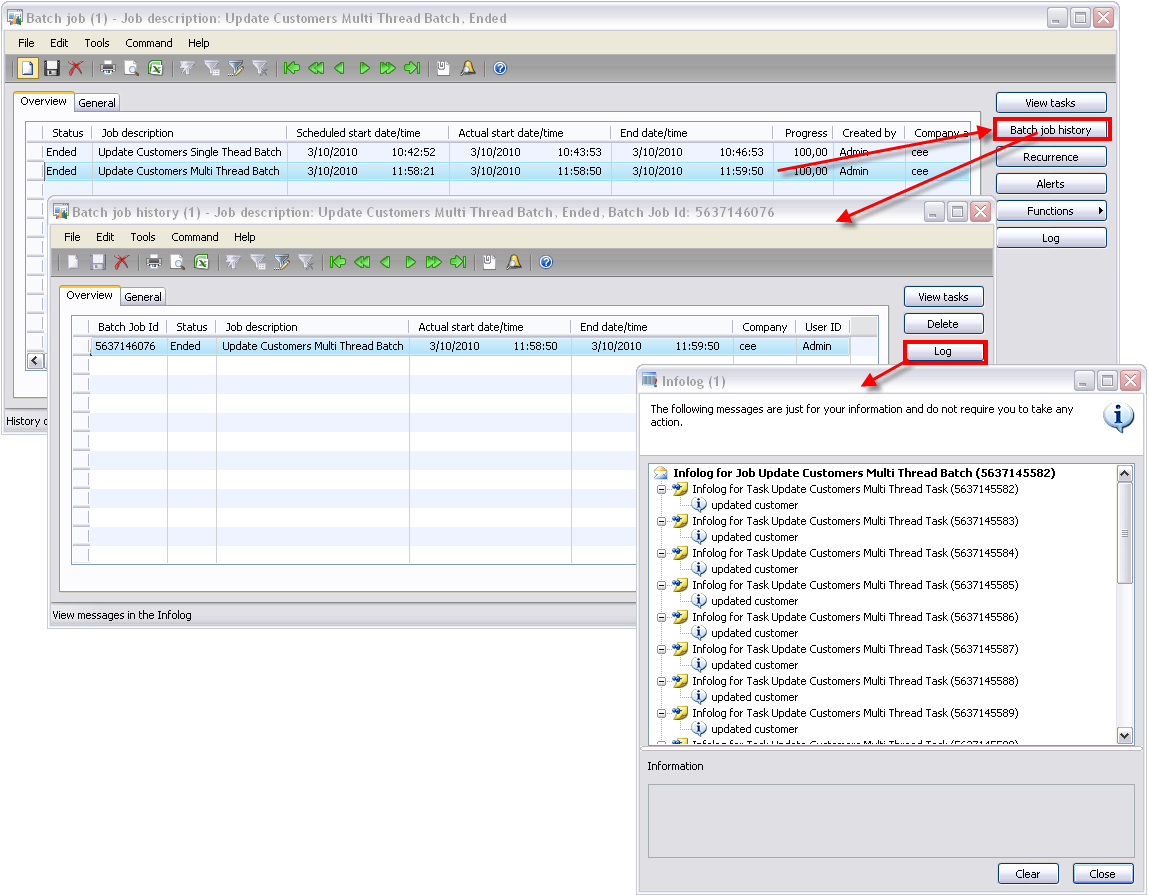
    Notice how the executing time has gone from 3 minutes to 1 minute according to the batch job screen.

    Alternatively, you could use a queryrun in you batch tasks class too. You could for example create a batch group per customer group if that makes more sense to you. The ‘per record’ approach is just an example, just do what makes the most sense in your situation. Sometimes it is better if the runtime tasks have a bit more to do, to counter the overload of creating the tasks.

    Conclusion


    This method has helped me a lot while dealing with performance issues. Be aware though, you could have problems with concurrency and heavy load (that I haven’t discussed here). But if you do it right, it will result in a huge performance boost.

    Spread the word :-).

    Download the XPO file by clicking here.

    Update 2011/02/11:
    There were two errors in the example:
    This line:

    batchHeader = BatchHeader::construct(this.parmCurrentBatch().RecId);

    Has been replaced with:

    batchHeader = BatchHeader::construct(this.parmCurrentBatch().BatchJobId);

    And this line:

    klForUpdateCustomersMultiThreadTask = KlForUpdateCustomersMultiThreadTask::newcustTable(custTable);

    Has been replaced with:

    klForUpdateCustomersMultiThreadTask = KlForUpdateCustomersMultiThreadTask::newcustTable(custTable.data());

    Todo on my part: update the XPO.

  • Cannot edit a record in Translation table (DEL_PBATranslateConsistOf). Access Denied

    August 29, 2010 at 13:54  (5 comments)

    When deleting a company account in Dynamics AX 2009, you can get the following errors:

    User ‘Admin’ is not authorized to delete a record in table ‘DEL_PBATRANSLATECONSISTOF). Request den[ied].
    Cannot edit a record in Translation table (DEL_PBATranslateConsistOf). Access Denied: You do not have sufficient authorization to modify data in database.

    This week was the n-th time someone has come to me with this problem, so it’s time to blog about it :-).

    The error you receive is odd, because user in question has enough rights to edit any table (administrator).
    This error occurs when you don’t have the Product Builder (PBA) license key enabled.

    There are two possible solutions to this problem:

    • Either activate the license key for Product Builder under Administration – Setup – System – License information (if you have the PBA license key), and after synchronizing the Data Dictionary, you should be able to delete the company account
    • Or if you don’t have the PBA license key, go to the AOT – Data Dictionary – Tables – DEL_PBATranslateConsistOf, and clear the security key property.
  • Trivial: by in group by is optional

    August 4, 2010 at 18:11  (4 comments)

    Here is something I did not know: apparently, the ‘by’ in ‘group by’ is optional.

    The following job compiles just fine, and outputs the correct result:

    static void KlForGroupBy(Args _args)
    {
        InventTable inventTable;
        ;
       
        while select inventTable
        group by ItemGroupId
        {
            info(inventTable.ItemGroupId);
        }
       
        info('------');
       
        while select inventTable
        group ItemGroupId // without by
        {
            info(inventTable.ItemGroupId);
        }
    }

    It looks funny though :-).

  • Linked server sql statements

    July 23, 2010 at 18:29  (no comments)

    Hi all, hope you are well.

    Some time ago, I talked about executing direct sql statements, and now I want to share some sql statements that I used to manage linked server connections.

    What follows are 4 sql statements that allow you to add en remove linked servers on a database at runtime.

    Some assumptions:
    – There is a str variable named “query” that will contain the query
    – there is a parm method on the class that return the sql server (“server” or “server\instance”)
    – there is a parm method that returns a username
    – there is a parm method that returns a password

    Check if linked server exist
    First check if the linked server doesn’t exist yet, or you will get an error when you try to add one that already exists.

    query = strfmt("select top 1 * from sys.servers where name = '%1'", this.parmServer());

    Add linked server
    When the linked server doesn’t exist, add it.

    query = strfmt("EXEC sp_addLinkedServer @server = '%1', @srvproduct=N'SQL Server'", this.parmServer());

    Add linked server login
    Optionally, you can add a login that will be used to connect to the linked server.

    query = strfmt("sp_addlinkedsrvlogin @rmtsrvname = '%1' ,@useself = FALSE, @locallogin = NULL, @rmtuser = '%2', @rmtpassword = '%3'",
                        this.parmServer(),
                        this.parmUsername(),
                        this.parmPassword());

    Remove linked server
    Optionally, you can remove the linked server.

    query = strfmt("EXEC sp_dropserver '%1', 'droplogins'", this.parmServer());
  • Dynamics AX 2009 RU5 backwards compatibility problem

    July 22, 2010 at 14:43  (17 comments)

    Hi all!

    There seems to be a problem with the recently released RU5 for Dynamics AX 2009 SP1.
    Dynamics AX clients are supposed to be backwards compatible, so you can always use the latest client, even if you want to connect to an application with a lower version (e.g. AX 2009 RU4 client to AX 2009 RU3 application). (Edit: Read comment #4 by Florian Dittgen)

    But when I tried to connect to an AX 2009 RU3 application (5.0.1500.1313) after I updated my client to RU5 (5.0.1500.2985), it didn’t work.
    Dynamics AX only shows the first record in the forms when you use that combination, as you can see in the screenshot below.

    Roll up 5 screenshot

    Roll up 5

    When you connect using a RU4 client (or RU3), there is no problem at all.

    Roll up 4

    You can uninstall a hotfix rollup from the Add/Remove software screen in the windows control panel if you want to.

    I prefer to duplicate the client folder each time I upgrade it so I have all client versions available.
    Just fire up bin\ax32.exe for the version you want and you’re good to go :-).

  • Forms Tutorial_Resources and SysImageResources

    June 28, 2010 at 19:10  (3 comments)

    On multiple occasions, you can add an icon to an object. Like for example on menus. You can add an image by setting the NormalImage property to a path, or you can use the NormalResource property.

    The only problem with the NormalResource property is that it asks for an integer. But how do you know what integer the icon has that you want to use?

    You can use this form:
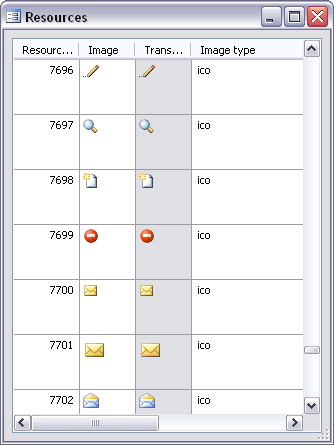
    Depending on what AX version you are using, the name of the form is different:
    Dynamics AX 4: form Tutorial_Resources
    Dynamics AX 2009: form SysImageResources

    For some reason, Microsoft changed the name of that form in AX 2009, and because I started working with AX version 4.0, I always forget the name of that new form :-).

    Update: in AX 2009, you can also open this form in the AX menu; click Tools – Development Tools – Embedded resources.

  • Executing direct SQL statements

    June 21, 2010 at 18:35  (19 comments)

    Hi everyone,

    Today I want to talk about executing SQL statements in X++ on both the AX database and external databases. This is something probably every AX developer will have to do at some point.

    You’ll want to do this for many reasons; to execute stored procedures, to improve performance, to get data from an external database, and so on.

    I will provide samples for two classes:
    – Connection (Execute SQL statement on current AX database)
    – ODBCConnection (Execute SQL statement on external database)

    I will not cover the ADO connection (CCADOConnection class), because it doesn’t work when you run it on server (or in batch), and I don’t like that. If you do, try to convince me ;-).

    Executing direct SQL on the current AX database

    When you execute a SQL statement, there are two options:
    – either you did a select and you expect a result to be returned
    – or you did insert/update/delete and you don’t expect a result.

    The first sample is for a SQL statement that returns a result:

    public static server void main(Args _args)
    {
        Connection      connection;
        Statement       statement;
        str             query;
        Resultset       resultSet;
        ;

        // create connection object
        connection = new Connection();

        // create statement
        statement = connection.createStatement();

        // Set the SQL statement
        query = 'select name from CustTable';

        // assert SQL statement execute permission
        new SqlStatementExecutePermission(query).assert();

        // when the query returns result,
        // loop all results for processing
        //BP Deviation documented
        resultSet = statement.executeQuery(query);

        while(resultSet.next())
        {
            // do something with the result
            info(resultSet.getString(1));
        }

        // limit the scope of the assert call
        CodeAccessPermission::revertAssert();
    }

    Note: this is a main method, put it in a class. Also note that it has to run on server.

    Now if you do an update/delete/insert, you will want to do something like this:

    public static server void main(Args _args)
    {
        Connection      connection;
        Statement       statement;
        str             query;
        ;

        // create connection object
        connection = new Connection();

        // create statement
        statement = connection.createStatement();

        // Set the SQL statement
        query = "insert into CustTable (AccountNum, Name, RecId) values ('demo', 'demo', 2)";

        // assert SQL statement execute permission
        new SqlStatementExecutePermission(query).assert();

        //BP Deviation documented
        statement.executeUpdate(query);

        // limit the scope of the assert call
        CodeAccessPermission::revertAssert();
    }

    You can find more info about the executeQuery() and executeUpdate() methods on msdn:
    Statement Class

    Executing direct SQL on an external database using ODBC

    Again, we have to differentiate between queries that return a result and those that don’t.

    The following code sample retrieves records from an external database and processes the result:

    public static server void main(Args _args)
    {
        Statement       statement;
        str             query;
        Resultset       resultSet;
        LoginProperty   loginProperty;
        OdbcConnection  odbcConnection;
        ;

        loginProperty = new LoginProperty();
        loginProperty.setDSN('YOURDSN');

        odbcConnection = new OdbcConnection(loginProperty);

        // Create new Statement instance
        statement =odbcConnection.CreateStatement();

        // Set the SQL statement
        query = 'select name from CustTable';

        // assert SQL statement execute permission
        new SqlStatementExecutePermission(query).assert();

        // when the query returns result,
        // loop all results for processing by handler
        //BP Deviation documented
        resultSet = statement.executeQuery(query);

        while(resultSet.next())
        {
            // do something with the result
            info(resultSet.getString(1));
        }

        // limit the scope of the assert call
        CodeAccessPermission::revertAssert();
    }

    As you can see, the code is pretty similar. The main difference is that we are using ODBC classes, including the LoginProperty class.

    In this example, I use a DSN (Data Source Name) that I configured on the AOS server. The DSN contains a reference to the server and database you want to connect to, and also what user credentials should be used to connect to the database. This is a lot safer than storing them in AX.
    If you don’t know how to create a DSN, there are plenty of tutorials on the web.

    To update/delete/update, the code is more or less the same:

    public static server void main(Args _args)
    {
        Statement       statement;
        str             query;
        LoginProperty   loginProperty;
        OdbcConnection  odbcConnection;
        ;

        loginProperty = new LoginProperty();
        loginProperty.setDSN('YOURDSN');

        odbcConnection = new OdbcConnection(loginProperty);

        // Create new Statement instance
        statement =odbcConnection.CreateStatement();

        // Set the SQL statement
        query = "insert into CustTable (AccountNum, Name, RecId) values ('demo', 'demo', 2)";

        // assert SQL statement execute permission
        new SqlStatementExecutePermission(query).assert();

        // when the query returns result,
        // loop all results for processing by handler
        //BP Deviation documented
        statement.executeUpdate(query);

        // limit the scope of the assert call
        CodeAccessPermission::revertAssert();
    }

    If you feel that something is missing in these examples, just ask.

  • Now part of the Dynamics AX Community

    June 2, 2010 at 22:52  (5 comments)

    Hi everyone,

    Just to announce that this blog is now part of the Dynamics AX Community.

    You can read all about it in this warm welcome message on the Microsoft Dynamics AX Community Team blog.

    While you are at it, create a profile (if you don’t already have one), because with the newsgroups closing any time now, the Dynamics AX Community is the place to be for all your community needs.

  • Normalization dilemma

    May 29, 2010 at 00:42  (8 comments)

    Hi all!

    I have a dilemma, and would like your opinions.
    The situation is that I want to add fields to an existing table (say InventTable)

    What would you prefer:
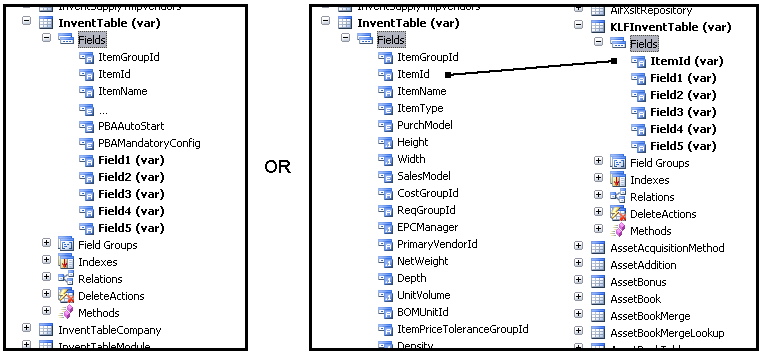
    Add fields or table

    So the question is, should I add new fields to the table (option one), or should I create a new table with the fields and link to it. (option 2)

    Normally, option 1 is the standard way of adding extra fields to a table, but option 2 has a few advantages:

    • You don’t need to modify the existing table
    • You’ll have less trouble with these fields when you have to upgrade AX
    • It will be easier to deploy your modifications in an AX environment that already contains modifications to the table

    There are also a few disadvantages I can think of:

    • You have to join 2 tables to get the data from the new fields
    • You can’t add the new fields to fields groups on the main table (InventTable in this example)
    • On forms, you will have to add a new data source, or add display fields

    I would certainly go for option 1 when doing customizations for a customer, but would consider option 2 for product development. I’m in doubt. How about you?

  • Creating a class, the best practice way

    May 18, 2010 at 13:40  (11 comments)

    Hi all!

    Some time ago, I talked about the ‘construct’ pattern that is use a lot in AX. Although I use it often, it’s not perfect because it violates some best practices. (Also, you could end up with a large class hierarchy of classes that extend each other, but I’ll discuss that in an other post.)

    First off, know that you can change the compiler level and the best practices the compiler checks.
    To do this, compile something so the compiler output window pops up. Then click the setup button, and adjust the settings.
    I used compiler level 4 and enabled all BP checks for this example.

    So, let create a simple class. This class will simply print information of an InventTable record to the screen.

    1. ClassDeclaration
    When we think about this class a bit, we immediately realize that we need to declare an InventTable record as a member of out class:

    /// <summary>
    /// Class written to test construct and new... patterns
    /// </summary>
    /// <remarks>
    /// Delete this class when proven a point :)
    /// </remarks>
    class KLFORTestBP
    {
        InventTable inventTable;
    }

    Also note that I added documentation to this method. I will do so for other methods too. When you don’t, you’ll get a BP deviation warning.

    2. Parm method
    One of the things that are important (or at least I find important), is using parm methods for your class variables. So, let’s create one:

    // use parm methods to access class variables
    public InventTable parmInventTable(InventTable _inventTable = inventTable)
    {
        ;
        inventTable = _inventTable;

        return inventTable;
    }

    3. New method
    You should never write code in the new method, or add parameters to it. On the contrary, you should always set this method to protected, and use a static construct() or a static new…() method instead.

    // a new method should be protected
    // use static new... or construct instead
    protected void new()
    {
    }

    4. Run method
    The run method will be our method that contains our logic. Here, we print info to the screen

    /// <summary>
    /// Executes logic on the parameters of this class
    /// </summary>
    /// <remarks>
    /// Just for demo purposes
    /// </remarks>
    public void run()
    {
        ;
        info(this.parmInventTable().NameAlias);
    }

    Note that we are using the parm method instead of directly accessing the variable.

    5. Construct method
    Because the new method is now protected, we will need a contruct method to be able to create an instance of this class.

    private static KLFORTestBP construct()
    {
        ;
        return new KLFORTestBP();
    }

    When a class doesn’t need parameters, you can leave out the ‘private’, but now, it is private because we plan on creating a new…() method that contains parameters. A construct method shouldn’t contain parameters, and should only be used to create a new instance of your class. It is also the only place in your application where you can call the new() method of your class.

    6. New…() method
    As said earlier, because we need a parameter (an InventTable record), we use a new…() instead of the construct method to create an instance of our class. I will name it newFromInventTable() based on the parameter it has.
    In this method, we call the contruct() method to create an instance (instead of new()), set the parm method from the parameter and return the object.

    /// <summary>
    /// Creates a new KLFORTestBP object from an InventTable record
    /// </summary>
    /// <param name="_inventTable">
    /// The InventTable used to create the object
    /// </param>
    /// <returns>
    /// New instance of KLFORTestBP with the InventTable parameter set
    /// </returns>
    /// <remarks>
    /// Use a new... method instead of the constuct method because it takes parameters/// A
    /// </remarks>
    public static KLFORTestBP newFromInventTable(InventTable _inventTable)
    {
        KLFORTestBP kLFORTestBP;
        ;

        kLFORTestBP = KLFORTestBP::construct();
        kLFORTestBP.parmInventTable(_inventTable);

        return kLFORTestBP;
    }

    You could also create an init() method that initializes you class (we don’t need initialization now). The init() method should return a boolean if initialization can go wrong, so you can throw an error.
    It would look like this:

    public static KLFORTestBP newFromInventTable(InventTable _inventTable)
    {
        KLFORTestBP kLFORTestBP;
        ;

        kLFORTestBP = KLFORTestBP::construct();
        kLFORTestBP.parmInventTable(_inventTable);

        if(!kLFORTestBP.init())
        {
            throw error("Item record has no data"); // todo: create label
        }

        return kLFORTestBP;
    }

    Remember to create a label for the text string, or you will get a best practice error.

    7. Main method
    Now, all we need more is a main method, so this class is runable (by pressing F5 or as a menu item).

    server public static void main(Args _args)
    {
        KLFORTestBP kLFORTestBP;
        InventTable inventTable;
        ;

        if(_args && _args.dataset() == tablenum(InventTable))
        {
            // a button was pressed on a InventTable datasource
            inventTable = _args.record();
        }
        else
        {
            // for demo, simple select the first one
            select firstonly inventTable;
        }

        // display item information
        kLFORTestBP = KLFORTestBP::newFromInventTable(inventTable);
        kLFORTestBP.run();
    }

    Normally, you will get the record from the args object, but for demo purposes, I added the ‘select firstonly’ so you can run the class by pressing F5. As you can see, the new…() method is used to create an instance of the class, and then the run method is called.

    There you go, you now have a best practice deviation free class!

    8. Using the class
    Using the class as a menu item or in code couldn’t be easier.

    You can drag/drop the class to the action menu item node in the AOT to create a menu item, and you will be able to use it on any form with the inventTable datasource.

    From code, you can simple write this line (assuming there is a variable called inventTable):

    KLFORTestBP::newFromInventTable(inventTable).run();

    Conclusion:
    When writing code that doesn’t contain any best practice deviations (especially when checking them all on compiler level 4), you quickly end up with a lot of methods in your class and wondering if the effort is worth it. It can be a bit painful to get your code best practice deviation free.

    However, you’ll also realise that following the best practices has its advantages. Your code will be cleaner, easier to understand, easier to debug because of the parm, constuct and run methods, less subject to change, contain less errors and your class will be used in the way you intended when you wrote it.

    More info on MSDN:
    Best practices for constructors

  • AllowDuplicates Yes: Illegal property value

    May 17, 2010 at 18:06  (no comments)

    When changing the property AllowDuplicates on a table index from No to Yes, the following error can be thrown at you:

    Illegal property Value

    This is because on your table, the property PrimaryIndex is set to the index you are trying to change.

  • Microsoft closing AX newsgroups

    May 10, 2010 at 10:39  (2 comments)

    Microsoft will begin closing its newsgroups, including the Dynamics AX newsgroups, as announced here:
    http://www.microsoft.com/communities/newsgroups/default.mspx

    It’s a shame, because I visit the AX development group using the web based news reader daily, and I will miss it.

    Where will we go now? To the Dynamics Forums?

  • Split big text files in smaller ones in X++

    April 21, 2010 at 18:16  (no comments)

    Below is a job I found useful many times, so don’t want to loose it.
    Nothing special, but maybe you’ll find it useful too.

    It splits an input text file into smaller files.
    As there is one comment line for every line of code (almost), I’m sure you’ll figure it out :-).

    static void KlForSplitFile(Args _args)
    {
        #File
        AsciiIO             inFile, outFile;
        container           rec;
        int                 cnt = 0, fileNum    = 0;
        FileName            outFileName;
        FileIOPermission    filePermissionOrig, outFilePermission;
        Set                 permissionSet = new set(types::Class);

        // settings begin
        // input file
        str                 _inFileName = @"C:\temp\testsplit\testsplit.csv";
        // max number of lines
        int                 _maxrec = 20000;
        //settings end
        ;

        //
        // first loop to create the permission set
        //

        // assert permission for read
        new FileIOPermission(_inFileName, #io_read).assert();

        // create new asciiIo for the file we are reading in
        inFile  = new AsciiIo(_inFileName,#io_read);

        // read file to check how many files will be created
        while(inFile.read())
        {
            if(cnt == _maxrec || cnt == 0)
            {
                // 1 more file
                filenum++;
                // create filename
                outFileName = strfmt('%1_%2.csv',
                substr(_inFileName,1,strlen(_inFileName) - 4), fileNum);
                // create permission
                outFilePermission = new FileIOPermission(outFileName,#io_write);
                // add permission to set
                permissionset.add(outFilePermission);
                // reset line counter
                cnt = 0;
            }
            // 1 more line
            cnt++;
        }

        // also add fileIn permission to set
        filePermissionOrig =  new FileIOPermission(_inFileName, #io_read);
        permissionset.add(filePermissionOrig);
        // revert permission assertion
        CodeAccessPermission::revertAssert();

        // assert permissions for set
        CodeAccessPermission::assertMultiple(permissionset);

        //
        // loop file again and split
        //

        // reset counters
        fileNum = 0;
        cnt     = 0;

        // create new asciiIo for the file we are reading in
        inFile  = new AsciiIo(_inFileName,#io_read);

        // read file to check how many files will be created
        // read ahead
        rec = inFile.read();
        while(rec)
        {
            if(cnt == _maxrec || cnt == 0)
            {
                // 1 more file
                filenum++;
                // create filename
                outFileName = strfmt('%1_%2.csv',
                substr(_inFileName,1,strlen(_inFileName) - 4), fileNum);
                outFile = new AsciiIO(outFileName,#io_write);
                // reset line counter
                cnt = 0;
            }
            // 1 more line
            cnt++;
            // write to split file
            outFile.writeExp(rec);
            // read next line
            rec = inFile.read();
        }

        // revert permission assertion
        CodeAccessPermission::revertAssert();

        info('done');
    }
  • AIF: ‘EndElement’ is an invalid XmlNodeType

    April 20, 2010 at 11:31  (no comments)

    Hi all.

    I got this error when developing a C# .NET application that consumed a AIF web service, and couldn’t find a solution online so let me share mine :-).

    The problem was that I initialised my queryCriteria wrong:

    CriteriaElement ace = new CriteriaElement();
    ace.FieldName = "AccountNum";
    ace.Value1 = "000001";

    I forgot the specify the datasourcename and operation:

    CriteriaElement ace = new CriteriaElement();
    ace.FieldName = "AccountNum";
    ace.Value1 = "000001";
    ace.DataSourceName = "VendTable";
    ace.Operator = Operator.Equal;
  • « Previous Page

    Next Page »


Best value on tickets: wickedthemusicaltickets.top 100% guaranteed tickets: luke bryan concert tickets Discount Broadway Tickets - hamiltonmusicaltickets.top View dates for upcoming Billy Joel concert tour - http://billyjoeltourtickets.top Discount Tickets for Broadway, find cheap Hamilton Broadway Tickets Tickets On Sale For All Dates - Eric Church Tour 2017 Major League Baseball Tickets. Get your SF Giants Tickets and save Search all sellers and save on cheap Indians Tickets

Wordpress // Photon theme // Copyright © Klaas Deforche


Loading Comments...