I attended TechDays 2010 in Antwerp this month and you could read about it on my blog, and apparently, videos of all sessions are available of channel 9.
After installing an AIF web server and deploying services on it, I got an error when I tried to browse my web service http://myhost:82/MicrosoftDynamicsAXAif50/itemservice.svc.
The error was:
HTTP Error 404.3 – Not Found
When I tried to add a web reference the svc in visual studio .NET, I got a similar error:
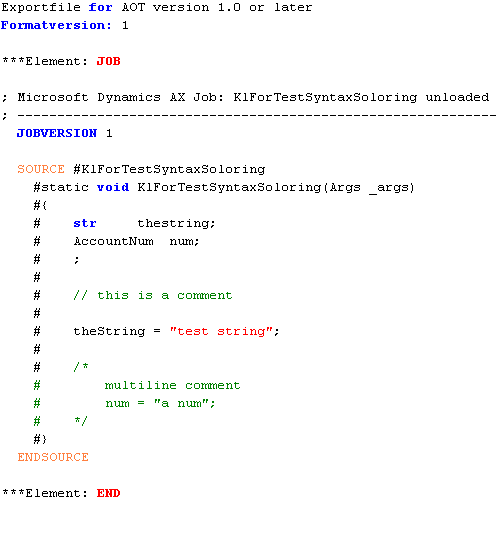
There’s this little bug in the X++ editor that I find fairy annoying.
When you paste text at the beginning of a line, the first character get overwritten.
// inner method: // spit string at delimeter, keep left substring str lSplit(str _s,str _delimeter ) { str s =""; int pos; int len =strlen( _s );
pos =strfind( _s, _delimeter,0, len );
s =strdel( _s,pos,len-pos+1);
return s; }
;
// fix all actions whileselect aIFAction { // get 'real' classid
classId = classname2id(lSplit(aIFAction.ActionId,'.'));
// check if classid and classname match if(aIFAction.ClassId!= classId) { if(classId ==0) { // class does not exist
warning(strfmt("Class %1 does not exist", lSplit(aIFAction.ActionId,'.'))); } else { // doesn't match // update classid ttsbegin;
aIFAction.selectForUpdate(true);
aIFAction.ClassId= classId;
aIFAction.update();
A somewhat non-intuitive way of accessing controls on a form is using a built in enum named ‘control’. This enum automatically contains all controls of you form (tabs, buttons, etc), and you can reference them by name.
So, if for example your button is called ‘ButtonFunctions’, you can set the property ‘enabled’ to false like this:
Sometimes, you can’t synchronize a table because is contains duplicate records. This can occur when you change field lengths on a extended data type for example.
I’ve seen people write huge SQL statements, and even jobs that create these SQL statements to remove these duplicates from a table, but there’s actually a easy way to do this in AX.
Say you have a table KLFTestDuplicates that contains duplicates, then simple run the following job to remove them.
staticvoid KLFRemoveDuplicates(Args _args) {
Set fieldSet =new set(Types::Integer);
DictIndex dictIndex =new DictIndex( tablenum(KLFTestDuplicates), indexnum(KLFTestDuplicates, AUniqueIdx)); int i;
;
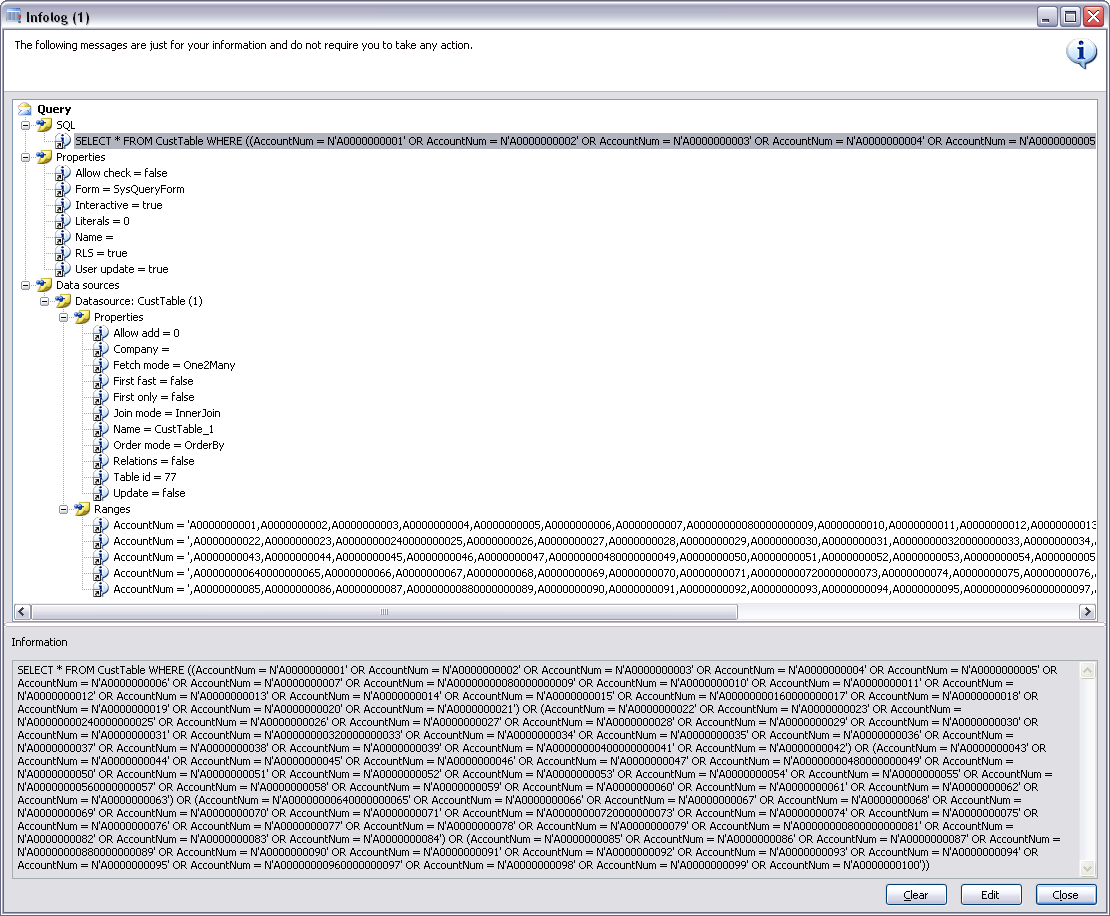
When creating a query and adding ranges, you might notice that there is a limit on how the range string can be. This limit is defined by the extended data type Range that you can find in the AOT. You can try extending the size to a bigger stringsize, but you can’t go too high before you run into limits that the sql database will have (I think this value is around 1700 characters).
What you can do is add multiple smaller ranges on the same field in stead of one long range.
I’ve written a method that splits a long range and adds it to you queryBuildDataSource:
privatestaticvoid splitAndAddRange(QueryBuildDataSource _qbds,
fieldId _fieldId, str _sRange) {
#AOT // used to split and build ranges int splitPos; // max position for splitting int cPos; // position of ',' str fRange; // first part of the range str lRange; // last part of the range
QueryBuildRange qbr; // the extra qbr if needed
;
// define max lenght // note: make this function none static and get the stringsize property only once while initialising your class // to speed up performance
splitPos = treenode::findNode(#ExtendedDataTypesPath + #AOTRootPath +'Range').AOTgetProperty('StringSize'); // define range string
// init cPos
cPos =-1; // if range is too long -> split (3 should be 1500) if(strlen(_sRange)> splitPos) { // while no comma found while(cPos ==-1&& splitPos >0) { // if char at current position is ',', split position found if(substr(_sRange, splitPos,1)==',')
cPos = splitPos; // else try prev char else
splitPos--; }
// get the first part of the range
fRange =substr(_sRange,0, splitPos -1); // make new range and add it
qbr = _qbds.addRange(_fieldId);
qbr.value(fRange);
// get the remaining part of the range
lRange =substr(_sRange, splitpos,strlen(_sRange));
// split the rest of the range if(strlen(lRange)>0) {
KLFSplitAndAddRangeTest::splitAndAddRange(_qbds, _fieldId, lRange); } } else { // range is not too long, don't split, just add
qbr = _qbds.addRange(_fieldId);
qbr.value(_sRange); } }
When you put this method in a class along with the following one, you can test the method.
When I was starting to learn about AIF, I made a list of the resources I used to get familiar with it.
I know how hard it is to learn AIF (there’s a lot you need to know), so I’d like to share this list of links with you.
Some lines of code in AX look a bit strange, #if.never is one of those. I notice that some people don’t fully understand what this is for, or don’t know when and how to use it.
Take a look at the following code sample:
staticvoid klforIfNever(Args _args) {
;
#if.never
some text or maybe some code:
i = i++;
#endif }
Notice that this will compile although the code between #if.never and #endif has no valid syntax.
How does this work?
The #if macro is one of the built in macro’s in ax. It tests if a macro has been defined.
As you know, you can define a macro like this:
#Define.YourMacro
To test if this macro has been defined, type:
#if.YourMacro
When testing if a macro has been defined, you should end your #if with #endif to make your code compile, just like in the sample job above.
So basically, #if.never is a way to test if the macro named “never” has been defined.
A little side effect of testing whether a macro has been defined using #if and #endif is that if the macro hasn’t been defined, the code in between the #if and #endif will not be compiled or executed. Basically, you can write anything in there, as long as you don’t define the macro (#if.blabla would also work, but #if.never is clearer).
Why would you write code that doesn’t get compiled and executed? Here are two reasons I can think of:
You can use it in interface classes to provide sample code on how the class can be implemented (See: sysPackable).
You can use it as an alternative to commenting out code. Using #if.never will still show your code with markup in stead of everything in green.
So next time you see #if.never, you know what it is for :).
Last week, I attended TechDays 2010 in Antwerp. During day 2, Scott Hanselman did a half an hour session during lunch titled “How to make your blog suck less”. The session was on an article he wrote on his blog: 32 Ways to Keep Your Blog from Sucking.
Based on his session, I made my personal top 3 todo-list for my blog:
Hi again. Yesterday was day two of two of TechDays 2010 in Antwerp for me, and here are my findings. Read about day one here.
I attended following sessions:
UnKeynote – Lap Around .NET 4 by Scott Hanselman
Deepdive into Windows Azure by Sumit Mehrotra
How to make your blog suck less by Scott Hanselman
Visual Studio 2010 IDE Tips by Sarah Ford
What is new in WCF4 by Peter Himschoot
Same as the day before, I didn’t take any notes, so here’s what stuck in my head:
1. UnKeynote – Lap Around .NET 4 by Scott Hanselman
This session by Scott was more or less what Anders Hejlsberg talked about the day before (he even used some of the same demo’s), but he talked about it with so much passion that you weren’t bothered by that. Same as Anders, he talked about the ‘dynamic’ type that improves the interoperability between languages, the parallel processing and more. He’s such a good speaker that I decided to go to his session about blogging later that day.
2. Deepdive into Windows Azure by Sumit Mehrotra
I was totally new to Windows Azure [wiki] when I went to this session, but although it was a ‘deep dive’, I think the global idea about what Azure is got across just fine.
Basically, Microsoft has put data centers all over the world, and they have provided Azure as a service that you can subscribe to that deploys your applications on these servers. You don’t have to worry about setting up servers, making sure that the setup is redundant, that there is load balancing, etc, Azure does this for you. You just focus on creating applications so you have more time to create value for your customer, and then deploy them on the Azure “cloud”. From then on, if you want your application to be available on an other continent, if you want it to go faster, if you want to upgrade, etc, it’s just a few clicks away (and Benjamins from your bank account).
I find it a really interesting service, and you and your customers will probably benefit from Azure in the long run.
3. How to make your blog suck less by Scott Hanselman
A very interesting session by Scott for bloggers. In fact, so interesting that I will blog about it in a separate post later.
4. Visual Studio 2010 IDE Tips by Sarah Ford
This session was fun, but kind of trivial, although I can imagine some tips being helpful when you’re working with Visual Studio all day. If you’re a .NET developer, you can check out her website, she has all tips and tricks over there as well.
Note: This was the only session I was planing on taking notes, but she specifically said not to do that, because everything is already on her website. Nice.
5. What is new in WCF4 by Peter Himschoot
Although I don’t know a lot about WCF (only basic stuff about web services and SOA), I found this session interesting because I have been working with AIF lately. Although AIF takes care of all the WCF stuff, it’s handy to know how WCF works in case something goes wrong.
Hi everyone. Today was day one of two at TechDays 2010 in Antwerp for me, and I would like to share my thoughts.
First of, the organization of the event was good and professional, and although it was a bit crowded at times, everything went pretty smooth and relaxing.
I attended the following sessions:
Developer Keynote – Trends and future directions in programming languages by Anders Hejlsberg
Branching & Merging strategies with Team Foundation Server 2010 by Pieter Gheyses
XNAstroids: How To develop the asteroids game in 30 minutes with the XNA framework by Timothy Vanherberghen
C# 4.0 and beyond by Anders Hejlsberg
ORM With ADO.NET Entity Framework in .NET 4.0 by Kurt Claeys
A lap aound Visula Studio 2010 Application Lifecycle Management by Brian Keller
Making TDD work using Virtual Studio 2010 by Bart Wullems
I’ll go into detail a bit, but as I didn’t take any notes during these session, I will only talk about the things that really stuck and that I found interesting.
1. Developer Keynote – Trends and future directions in programming languages by Anders Hejlsberg
In his keynote, Anders Hejlsberg talked abou the trends that he sees in programming languages and where it is all going in the future.
The things that I found interesting (and remembered :-)) the most were:
Programming languages will become a mix between dynamic languages and imperative languages. This means that we will see languages that will compile certains things at compile time, while also compiling things at runtime.
Because processors will have more and more cores, program languages will have to provide a way perform parallel processing in a more developer friendly than is the case now. We’ll also have to find a solution to concurrency (= running one task on multiple cores/processors)
2. Branching & Merging strategies with Team Foundation Server 2010 by Pieter Gheyses
Wow, this is interesting, and impressive. Well, maybe it might not be for .NET developers, but it is for me as an AX developer. If you don’t know what branching with TFS is, you can read about it here for starters. From what I’ve seen today, it allows you to do parallel development, and provides a proper way of maintaining release build and hotfixes on these (which can be bundled to a service pack).
That’s way better then what I was picturing when thinking about a version control system for AX, but definitely something that should be supported in future versions of AX. It’s just so much more than a version control system, that makes you wish you were a .NET developer :-).
3. XNAsteroids: How To develop the asteroids game in 30 minutes with the XNA framework by Timothy Vanherberghen
This was actually a half an hour session during the lunch break. I must say, while it was impressive to see Timothy build a game in such a short time, there was a lot of copy and pasting involved, and you probably couldn’t write this game in a half an hour when starting from scratch.
Nevertheless, XNA looks like a powerful tool for creating games, even for those who are just game enthusiasts and not ‘real’ programmers.
4. C# 4.0 and beyond by Anders Hejlsberg
This was probably the most technical and abstract sessions, but also the most interesting one. The things I want to talk about:
“Dynamic” in C#
After lecturing us about how good strongly typed languages are and such, Anders introduced the “dynamic” keyword (I keep typing Dynamics, don’t know why…). There’s a nice blog entry about it here, so I won’t try to explain myself.
Personally, while this ‘looks cool’ and such, I think it’s stupid (there I said it :-)) and you should strongly type it. While you could argue that ‘dynamic’ is a type itself, basically all it does is tell the compiler that it shouldn’t compile the code we write when calling methods and properties of this variable.
I’m totally against the kind of (meta) code below:
calcobject.callfunction("add", {1, 2});
Why? Because “add” is passed as a string and no compilation (=verification of code) that happens.
This is how it should be:
calcobject.add(1, 2);
And this is how it *IS* with ‘dynamic’ variables, but it doesn’t do any good when the ‘add’ doesn’t get compiled (verified) imho.
It’s exactly the same, it just looks better, but I’m not impressed with some new fancy syntax.
Named and optional parameters
Anyway, what I did agree with (and want in AX), are named parameters (optional parameters we already have). There are numeral articles on the web explaining this, so I wont do it here. Basically, if we had named parameters in AX, this would mean that we don’t have to specify all optional parameters that are declared before the parameter you want.
Concider this:
public void doSmth(str _str = "", int _i= 0)
When we want to pass _i, we have to specify _str, even if it’s optional.
So in stead of:
doSmth("", 1234)
We would be able to do this:
public void doSmth(_i:1234)
For now, only in C#, but maybe in AX in 201? :-).
5. ORM With ADO.NET Entity Framework in .NET 4.0 by Kurt Claeys
Well, I haven’t really become a fan of ADO.NET EF during this session, so I will be brief about this. I would conciser using this for small applications that I know wont have a significant load on the sql side, but for big applications, I think the framework will just be to slow. You probably could optimize by writing stored procedures, but that’s a bridge to far for me.
Also, on principle, I’m against ADO, as in AX (at least by default) it only runs on client side, and not on server.
6. A lap around Visual Studio 2010 Application Lifecycle Management by Brian Keller
This session was partially about branching with TFS that was also covered in the session by Pieter Gheyses, but zoomed out a bit to the lifecycle level. This session confirmed how brilliant the TFS solution is. I was also impressed with the interaction between these applications and the office suite, sharepoint, etc.
7. Making TDD work using Virtual Studio 2010 by Bart Wullems
I thought this was an interesting sessions, as it made me think about methodologies like TTD (Test driven design), but also SCRUM, etc. I believe that you shouldn’t be to fanatic about what methodology to use, because these methodologies only really define the “how”. How what? How to implement certain design/programming principles and best practices.
I think it is more important to understand the ‘why’ of these principles exists, so you really understand why you are doing things the way you do them. Everyone can do things as there told (how), but only the best understand it (why). When you understand the basic principles and patterns, you can benifit from them always, no matter what methodology you are using.
The weak point of TDD is that you can’t use it in all circumstances. In some cases, you can’t write unit tests so you can use TDD. One benefit is that it helps you understand principles and patterns better (like encapsulation). Or as Bart says it: “You get all of that for free”.
A while ago, I talked about deleting an AX company on SQL, but of course, you can also use the sp_MSforeachtable stored procedure to rename a company (= change the DataAreaId of a company).
In the next example, I rename CEE to CEA:
EXEC sp_MSforeachtable 'update ? set DataAreaID = "CEA" where ?.DataAreaID = "CEE"'
UPDATE DataArea SET ID ='CEA'WHERE DataArea.ID ='CEE' UPDATE CompanyDomainList SET CompanyID ='CEA'WHERE CompanyID ='CEE'
In part 1, we talked about the use of a protected new method and a static constructor, and how it helps improve your classes.
Now let’s see how it helps you maintain you code better when extending classes.
In the previous example, we printed some general information about a record to the screen.
Let’s say that, in case of CustTable we want to have information printed to to screen that is specific to this record, like the AccountNum or Name field.
1. ClassDeclaration KLFShowRecordInfo_CustTable
In the ClassDeclaration, we include the keyword ‘extends’ to specify that our new class extends the functionality of the class KLFShowRecordInfo.
class KLFShowRecordInfo_CustTable extends KLFShowRecordInfo { }
2. Construct method KLFShowRecordInfo_CustTable
We will also add a construct method to this class. This will create an instance of this class for us, and set the parm method.
Because we extend a class that contains this parm method, we don’t need to add it to this class again.
The switch will check which table is being processed, and will create an instance of KLFShowRecordInfo_CustTable in case of CustTable. For all other tables, it will construct an instance of KLFShowRecordInfo.
Conclusion
This concludes my articles about the protected new and construct methods. I realise that the examples are very simple, but the principle will remain the same, even in more complex scenarios.
To sum up:
My basic recommendations when creating classes are:
– Use a protected new method
– Use a construct method
– Use parm methods
– Create a run method that contains your business logic
– Instead of modifying existing classes, create new ones that extend existing